The Problem
- If you keep everything local, collaboration falls apart the moment a second editor or a remote colorist joins.
- If you push everything to the cloud, the edit bay slows down, so relinks, cache anxiety, and "is this the right version?" become a daily tax on the edit.
- Teams split the difference. Local drives for active media. Sync folders for handoffs. Shuttle copies for the colorist. A separate review link for the producer. Manual version tracking stitched together across chat threads and shared folders.
- It works until it doesn't, and it usually stops working right when the schedule can least afford it.
What Aspect Does for Post Teams
Aspect gives post teams one system for storage, editorial access, and review. Editors mount cloud media and work against it directly without waiting on downloads. Cache controls and pinning keep active material local when it needs to be. Frame-accurate review and version stacking keep notes and approvals tied to the right edit, and the approval chain is already clean when the project hits the finishing room.- Editors mount cloud media and work against it directly without waiting on downloads
- Cache controls and pinning keep active material local when it needs to be
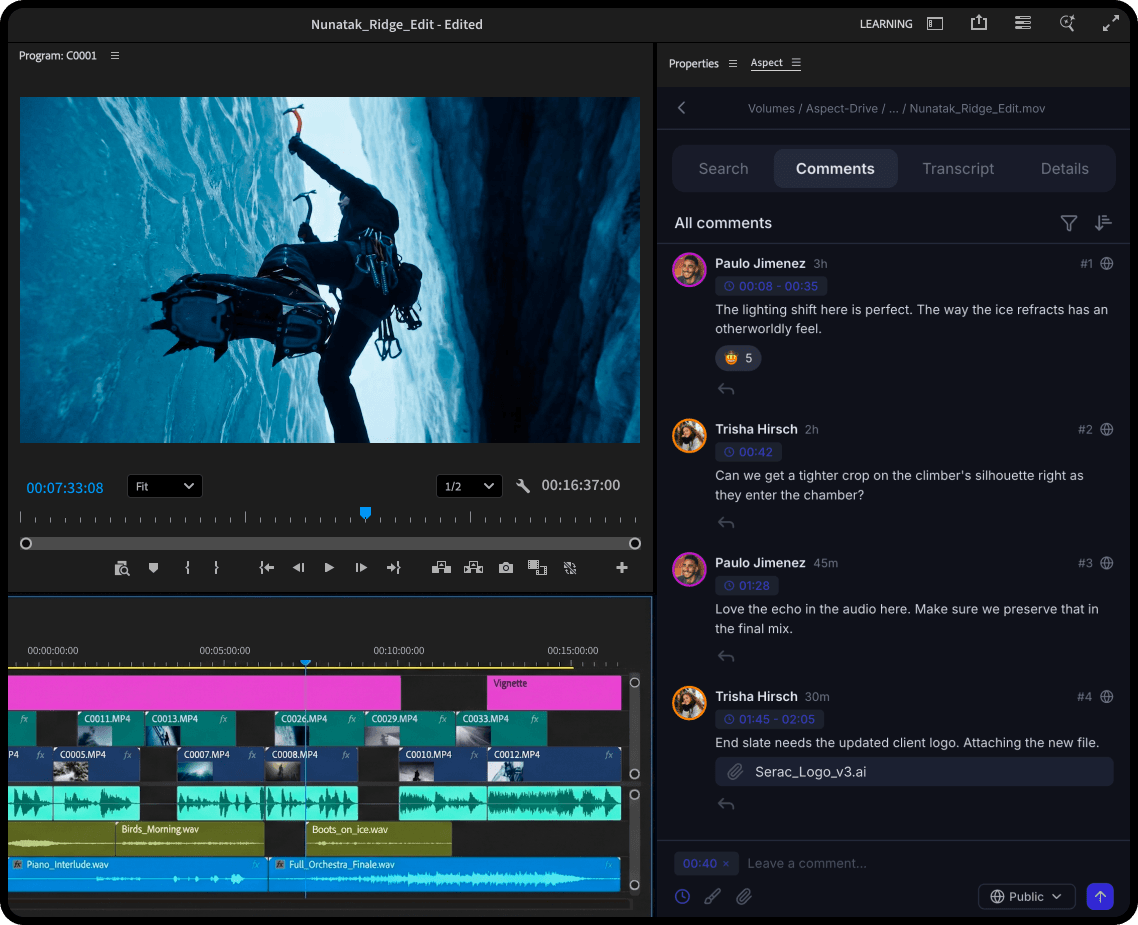
- Frame-accurate review and version stacking keep notes and approvals tied to the right edit
- The approval chain is already clean when the project hits the finishing room
The Solution
Offloading Made Easy
The moment footage is uploaded, it's available. Assistants mount the project, organize working sets, and pin the active sequences for the editor. There are no duplicate local copies and no waiting on a full-volume sync before the edit can start.Editorial
Editors open projects and pull only what they need through byte-range streaming and intelligent prefetching. The media feels local because there's no waiting to download the files. If they're on a flight or at a remote shoot, pinned files travel with them. This is what makes a hybrid workflow actually workable. The team keeps the parts of the project that need to be at hand and lets the rest stream on demand.Cache Management, Pinning, and Offline Work
Post teams don't need every file local all the time, but they do need control. Cache controls and pinning let assistants and editors decide what should stay local for active work, travel, or unstable connectivity, without turning the whole project into a storage management problem.Shared Workstations and Distributed Teams
One workstation's cached media benefits every machine on the same network. There's no more re-pulling the same selects across three edit bays. The second editor inherits the working set immediately, which saves repetitive downloading and gives a cleaner way to work with source materials.Review and Versioning
Producer notes land on the frame, not in a message thread. Version stacks keep prior rounds visible. Approvals stay attached to the edit they were actually given on. When the project moves downstream, the team has a clear picture of what was approved, what changed, and which versions actually matter.Finishing
When the project hits the finishing room, the approval chain is clean. Every version, annotation, and sign-off is right there. The colorist and finishing lead aren't chasing down which export was actually approved, and the workflow gives a clear view of the entire project.Recovery and Infrastructure Controls
As more workstations and more projects run at the same time, reliability stops being a background concern. Snapshots and BYOS make the workflow recoverable and trustworthy for both post teams and IT.What a Workflow on Aspect Unlocks
| The Bottleneck | How Aspect Solves It | What Your Team Gains |
|---|---|---|
| Mounted Cloud Media and Streaming: Waiting on full-volume downloads before the edit starts | Mount and edit the moment footage is uploaded | Every work session becomes productive and focuses on the main task |
| Cache Controls and Offline Pinning: Finding out mid-session that a file isn't on the machine | Decide what stays local for active work, travel, or unstable connectivity | Predictable editorial performance across locations, travel, and unstable connections keeps projects on schedule |
| Shared Cache Across Workstations: Every team member re-pulling the same files from scratch | One workstation's pull benefits every machine on the same network | One pull benefits the whole team, creating a fast working workspace |
| Frame-Accurate Review and Version Stacking: Notes living in Slack, email, or a browser tab from two rounds ago | Feedback lands on the frame it belongs to, tied to the version it was given for | Fewer wrong-version mistakes and faster producer sign-off, so approval cycles stop being the bottleneck |
| Transactional Reliability and Snapshots: Hoping the conform goes cleanly | Known-good states before every major handoff, so recovery takes seconds if something goes wrong | Lower risk at every major handoff keeps finishing on schedule and reduces costly rework |
| BYOS: Setting up new storage infrastructure just to use a new tool | Connect existing S3-compatible storage directly. Aspect layers on top of what's already there. | Storage policy stays aligned with the existing structure, reducing IT friction and security review time |
Does Aspect Fit Your Post Production Team?
Post teams that benefit most from Aspect tend to hit the same walls:- The team needs local editorial performance and cloud collaboration in the same system, not patched together with sync folders and shuttle drives
- Time is lost to relinks, duplicate copies, and unclear version state on every project
- Multiple workstations or distributed editors all touch the same active media
- The workflow should scale from assistant editor prep through finishing without adding tools at every stage